Sources for the article:
git is one of the most important parts of a developer's tools, but some of its features are not well known to most developers.
In this article, I want to show some advanced approaches and interest techniques that could help with resolving bugs, improving the working process, etc.

git bisect for debugging
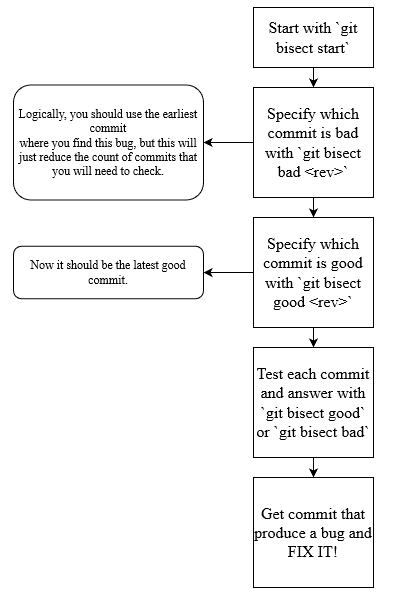
git bisect is a debugging tool that will help you find when a bug was created in your commit's history. To start using this tool, you need to have a bad commit (in which a bug was found) and a good commit (in which you don't have this bug). By using binary search bisect will try to find which commit was the initiator of this problem.
Example:
I have found a bug, that fully crashes my app after loading the web page. For founding this bug, I could use git bisect:
git bisect start

git bisect bad # or git bisect bad <rev>
git bisect good v1.0.0
As a rev you could use a version or commit hash.
Now after each message from git bisect, you will need to check if you can reproduce the bug. If you can then answer, git bisect bad or git bisect good otherwise.
In the end you will get the revision that created this bug.
You could use git bisect log for checking logs; this could be helpful if you forget where you stopped.
git stash for quick saving changes
git stash is commonly used for quickly saving changes without creating a commit. Ordinary usage would look like this:
# When you need to temporarily save some changes
git stash

# When you need to get back these changes
git stash pop
Additional cases:
- When you don't need to get the latest stash.
In this case you could use git stash list for getting list of all stashes and git stash <stash-index>.
Example:
You get such input from git stash list:
stash@{0}: WIP on (no branch): a3c5995 create feature
stash@{1}: fix problem
For the first index you could use just git stash pop; for using another index you could use:
git stash pop stash@{1}- Problem with merging stash and current state.
Sometimes I find myself in such a situation. A few times I used git stash pop not properly; for example, I needed to pop stash state one time, and instead of this, I repeated this command twice. In such a case you need to resolve the merge conflict.
git revert for reverting commits
git revert could help you create a commit that will revert changes to the commit that you select. Optionally, you could not create a commit after each git revert; in this way, you could revert multiple commits, and after this, create commit with all these changes:
git revert <rev>

# OR

git revert -n
git add -A
git commit -m 'revert fixes ae423, 1fkvu and k14mvs'
git submodule for using another git project as dependency
This technique could help to use another git repository as a dependency. This could be helpful for various needs: using repo as package, saving configurations, etc.
A project that has submodules is called a superproject.
To add a submodule, run these commands:
# This command will add repo as a submodule for your project
git submodule add <URL> <path>
More info about git submodules.
git reflog for fixing mistakes
reglog stands for "Reference logs", records when the tips of branches and other references were updated.
In general this will look as git history for most users.
git reflog show command shows history of changes made to git repo.
With such command you could go to prev revision and use it state to create branch and restore lost changes.